NBA 2K21 - How to Import Mods

September 05, 2020

Looyh released the first tool that allows you to import mods to NBA 2K21. This hook tool works using a mods folder where you place the files from where they are read by the game. Check out the details and get the tool.


First of all, this has only been tested with the Steam version of the game. No other version of the game is working with this tool.

It's really easy to install.

  • Unpack the files in your NBA 2K21 file main folder ( both two .dll files and mods folder )
  • Then you just need to place the mods files in the Mods folder inside NBA 2K21 main folder.
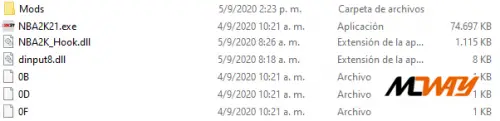
So let say we install Dell Curry Cyber Face.

  • You will have to place both files face1999.iff and png1999.iff files in Mods folder inside NBA 2K21 main folder.
OTHER NEWS THAT MAY INTEREST YOU

Ultimate Team

Two new evolutions arrived in Ultimate Team this Friday. One paid focused on improving CDMs and another from Training Camp, but ...

Gaming

IO Interactive, the creators of the Hitman franchise, alongside Amazon MGM Studios, have officially released the launch ...

Gaming

Multiple sources are reporting that Liga MX has officially signed a new partnership with EA Sports. This arrangement ensures ...

Modding

We put this tutorial together because we know that importing mods can be tricky if you've never done it before or aren't used ...

Announcement

If you’ve encountered a broken link or a "file not found" error while trying to download some of the mods hosted on our ...

Ultimate Team

New content is live in EA FC 26 Ultimate Team! Today’s May 20 update brings new players SBC to complete and a new Evolution ...